> For the complete documentation index, see [llms.txt](https://h08.gitbook.io/undefined/llms.txt). Markdown versions of documentation pages are available by appending `.md` to page URLs; this page is available as [Markdown](https://h08.gitbook.io/undefined/custom-rule-and-active-response/4./4.1.md).
# 4.1 (랜섬웨어 탐지) 인프라 자동 복구
## 1. 개요
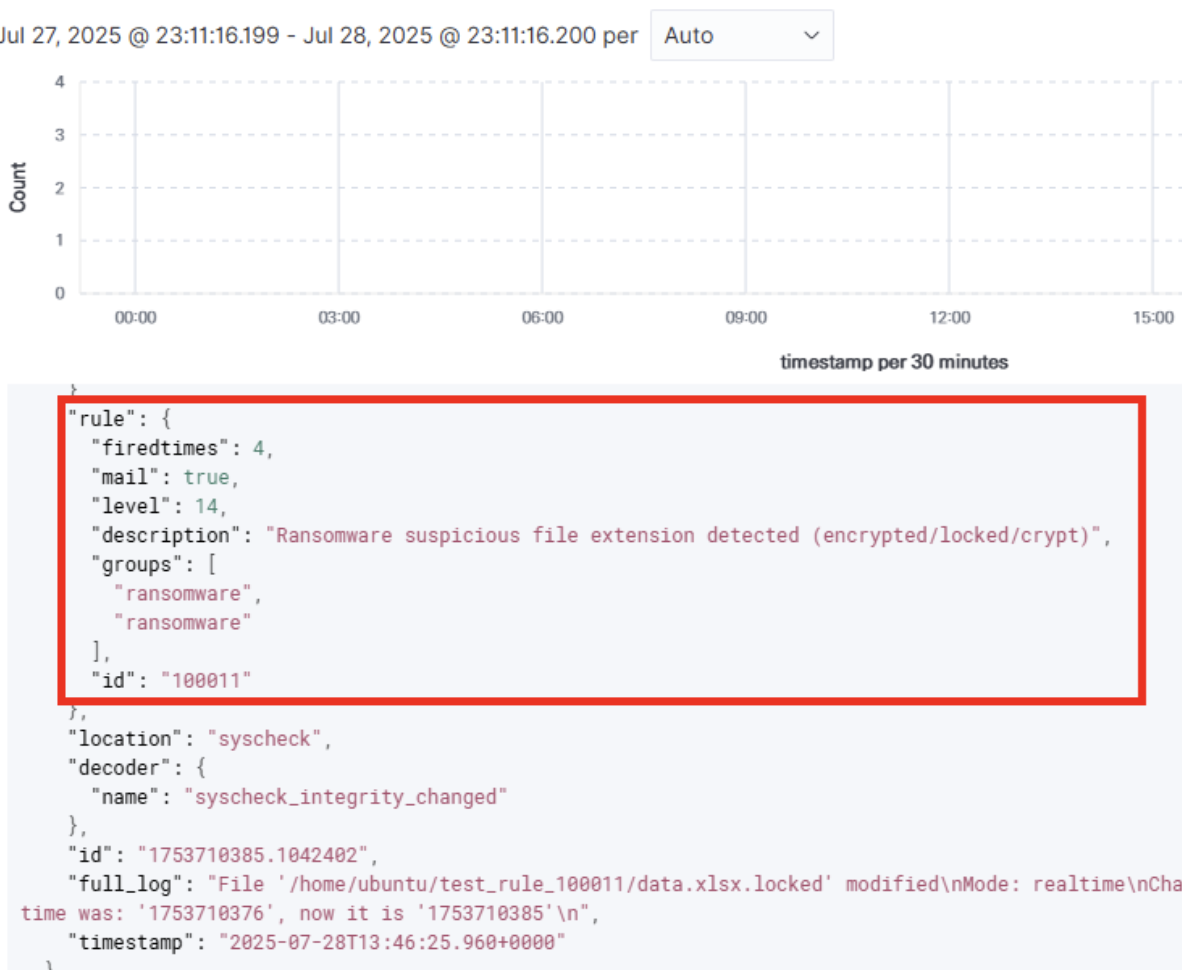
* Wazuh가 랜섬웨어 등 치명적인 위협(랜섬웨어)을 탐지 시Active Response가 Terraform(IaC)을 트리거하여 즉각적인 대응을 수행
* 이중 대응
* Forensic Isolation (포렌식 격리): 감염된 인스턴스의 스냅샷을 떠서 외부와 완전히 차단된 별도의 VPC(격리 구역)에 분석 환경을 자동 생성하여 증거를 보존
* Operation Recovery (운영 복구): 감염된 운영 인스턴스를 즉시 폐기하고, 검증된 '골든 이미지'를 기반으로 깨끗한 인스턴스를 재생성하여 서비스 가용성을 확보
***
## 2. 핵심 코드 및 룰
### 2.1 룰
### 100011 / 100012 / 100013
```
syscheck
\.(encrypted|locked|crypt)$
Ransomware suspicious file extension detected (encrypted/locked/crypt)
syscheck
README.txt|HOW_TO_DECRYPT.txt|HELP_RECOVER_FILES.txt
Possible ransomware note file created
550 60
60
possible ransomware activity
ransomware,
```
### 2.2 포렌식 격리 환경 구성
```tf
terraform {
required_providers {
aws = {
source = "hashicorp/aws"
version = ">= 5.0"
}
}
required_version = ">= 1.0"
}
variable "aws_region" {
description = "AWS region"
type = string
}
variable "forensic_snapshot_ids" {
description = "공백으로 구분된 포렌식 스냅샷 ID 목록"
type = string
}
variable "forensic_ami_id" {
description = "포렌식 인스턴스 AMI ID"
type = string
}
variable "forensic_instance_type" {
description = "포렌식 인스턴스 타입"
type = string
}
variable "forensic_key_name" {
description = "포렌식 인스턴스 EC2 Key Pair Name"
type = string
}
variable "forensic_instance_name" {
description = "포렌식 인스턴스 Name 태그(고유, 중복 없음)"
type = string
}
variable "forensic_source_instance_id" {
description = "감염 인스턴스의 ID"
type = string
}
variable "forensic_source_instance_name" {
description = "감염 인스턴스의 Name"
type = string
}
provider "aws" {
region = var.aws_region
}
resource "aws_vpc" "isolate" {
cidr_block = "10.200.0.0/16"
enable_dns_support = true
enable_dns_hostnames = true
tags = {
Name = "forensic-vpc"
Purpose = "isolation"
}
}
resource "aws_subnet" "isolate" {
vpc_id = aws_vpc.isolate.id
cidr_block = "10.200.1.0/24"
availability_zone = "${var.aws_region}a"
tags = {
Name = "forensic-subnet"
Purpose = "isolation"
}
}
resource "aws_security_group" "isolate" {
name = "forensic-sg"
vpc_id = aws_vpc.isolate.id
description = "Forensic instance - ALL ingress blocked"
# 모든 인바운드 차단
egress {
from_port = 0
to_port = 0
protocol = "-1"
cidr_blocks = ["0.0.0.0/0"]
}
}
locals {
snapshot_ids = split(" ", var.forensic_snapshot_ids)
device_names = ["/dev/xvdb", "/dev/xvdc", "/dev/xvdd", "/dev/xvde", "/dev/xvdf", "/dev/xvdg", "/dev/xvdh"]
}
resource "aws_ebs_volume" "forensic_vol" {
count = length(local.snapshot_ids)
availability_zone = "${var.aws_region}a"
snapshot_id = element(local.snapshot_ids, count.index)
tags = {
Name = "${var.forensic_instance_name}-vol${count.index}"
Purpose = "isolation"
Forensic = "1"
SourceId = var.forensic_source_instance_id
SourceName = var.forensic_source_instance_name
Created = timestamp()
Description = "Forensic EBS from ${var.forensic_source_instance_id}(${var.forensic_source_instance_name})"
}
}
resource "aws_instance" "forensic" {
ami = var.forensic_ami_id
instance_type = var.forensic_instance_type
key_name = var.forensic_key_name
subnet_id = aws_subnet.isolate.id
vpc_security_group_ids = [aws_security_group.isolate.id]
associate_public_ip_address = false
tags = {
Name = var.forensic_instance_name
Purpose = "isolation"
Forensic = "1"
SourceId = var.forensic_source_instance_id
SourceName = var.forensic_source_instance_name
Created = timestamp()
Description = "Forensic instance from ${var.forensic_source_instance_id}(${var.forensic_source_instance_name})"
}
}
resource "aws_volume_attachment" "forensic_vol_attach" {
count = length(aws_ebs_volume.forensic_vol)
device_name = local.device_names[count.index]
volume_id = aws_ebs_volume.forensic_vol[count.index].id
instance_id = aws_instance.forensic.id
force_detach = true
}
output "forensic_instance_id" {
value = aws_instance.forensic.id
}
output "forensic_instance_name" {
value = aws_instance.forensic.tags["Name"]
}
output "forensic_volumes" {
value = aws_ebs_volume.forensic_vol[*].id
}
```
### 2.3 운영 인프라 구성
```tf
provider "aws" {
region = "ap-northeast-2"
}
variable "key_name" {
description = "EC2 Key Pair Name"
type = string
default = "WHSkey"
}
# VPC 및 네트워크
resource "aws_vpc" "main" {
cidr_block = "10.0.0.0/16"
enable_dns_support = true
enable_dns_hostnames = true
tags = { Name = "WHS-vpc" }
}
resource "aws_internet_gateway" "igw" {
vpc_id = aws_vpc.main.id
tags = { Name = "WHS-igw" }
}
resource "aws_subnet" "public1" {
vpc_id = aws_vpc.main.id
cidr_block = "10.0.0.0/20"
availability_zone = "ap-northeast-2a"
map_public_ip_on_launch = true
tags = { Name = "public1" }
}
resource "aws_subnet" "private1" {
vpc_id = aws_vpc.main.id
cidr_block = "10.0.128.0/20"
availability_zone = "ap-northeast-2a"
tags = { Name = "private1" }
}
resource "aws_subnet" "private2" {
vpc_id = aws_vpc.main.id
cidr_block = "10.0.144.0/20"
availability_zone = "ap-northeast-2a"
tags = { Name = "private2" }
}
resource "aws_eip" "nat" {
domain = "vpc"
}
resource "aws_nat_gateway" "natgw" {
allocation_id = aws_eip.nat.id
subnet_id = aws_subnet.public1.id
tags = { Name = "WHS-natgw" }
depends_on = [aws_internet_gateway.igw]
}
resource "aws_route_table" "public" {
vpc_id = aws_vpc.main.id
route {
cidr_block = "0.0.0.0/0"
gateway_id = aws_internet_gateway.igw.id
}
tags = { Name = "WHS-rtb-public" }
}
resource "aws_route_table" "private1" {
vpc_id = aws_vpc.main.id
route {
cidr_block = "0.0.0.0/0"
nat_gateway_id = aws_nat_gateway.natgw.id
}
tags = { Name = "WHS-rtb-private1" }
}
resource "aws_route_table" "private2" {
vpc_id = aws_vpc.main.id
route {
cidr_block = "0.0.0.0/0"
nat_gateway_id = aws_nat_gateway.natgw.id
}
tags = { Name = "WHS-rtb-private2" }
}
resource "aws_route_table_association" "public1" {
subnet_id = aws_subnet.public1.id
route_table_id = aws_route_table.public.id
}
resource "aws_route_table_association" "private1" {
subnet_id = aws_subnet.private1.id
route_table_id = aws_route_table.private1.id
}
resource "aws_route_table_association" "private2" {
subnet_id = aws_subnet.private2.id
route_table_id = aws_route_table.private2.id
}
# 보안 그룹
resource "aws_security_group" "sg_bastion" {
name = "SG-bastion"
vpc_id = aws_vpc.main.id
description = "Bastion host SG"
ingress {
from_port = 22
to_port = 22
protocol = "tcp"
cidr_blocks = ["0.0.0.0/0"]
}
egress {
from_port = 0
to_port = 0
protocol = "-1"
cidr_blocks = ["0.0.0.0/0"]
}
}
resource "aws_security_group" "sg_web_public" {
name = "SG-web-public"
vpc_id = aws_vpc.main.id
description = "Public web SG"
ingress {
from_port = 80
to_port = 80
protocol = "tcp"
cidr_blocks = ["0.0.0.0/0"]
}
ingress {
from_port = 443
to_port = 443
protocol = "tcp"
cidr_blocks = ["0.0.0.0/0"]
}
ingress {
from_port = -1
to_port = -1
protocol = "icmp"
cidr_blocks = ["0.0.0.0/0"]
}
ingress {
from_port = 22
to_port = 22
protocol = "tcp"
security_groups = [aws_security_group.sg_bastion.id]
}
egress {
from_port = 0
to_port = 0
protocol = "-1"
cidr_blocks = ["0.0.0.0/0"]
}
}
resource "aws_security_group" "sg_web_private" {
name = "SG-web-private"
vpc_id = aws_vpc.main.id
description = "Private web SG"
ingress {
from_port = 80
to_port = 80
protocol = "tcp"
cidr_blocks = ["10.0.0.0/16"]
}
ingress {
from_port = 8084
to_port = 8084
protocol = "tcp"
cidr_blocks = ["10.0.0.26/32"]
}
ingress {
from_port = 22
to_port = 22
protocol = "tcp"
security_groups = [aws_security_group.sg_bastion.id]
}
egress {
from_port = 0
to_port = 0
protocol = "-1"
cidr_blocks = ["0.0.0.0/0"]
}
}
resource "aws_security_group" "sg_db_1" {
name = "SG-db-1"
vpc_id = aws_vpc.main.id
description = "DB1 SG"
ingress {
from_port = 3306
to_port = 3306
protocol = "tcp"
security_groups = [aws_security_group.sg_web_public.id] # Public Web만 허용
}
ingress {
from_port = 22
to_port = 22
protocol = "tcp"
security_groups = [aws_security_group.sg_bastion.id]
}
egress {
from_port = 0
to_port = 0
protocol = "-1"
cidr_blocks = ["0.0.0.0/0"]
}
}
resource "aws_security_group" "sg_db_2" {
name = "SG-db-2"
vpc_id = aws_vpc.main.id
description = "DB2 SG"
ingress {
from_port = 3306
to_port = 3306
protocol = "tcp"
security_groups = [aws_security_group.sg_web_private.id] # Private Web만 허용
}
ingress {
from_port = 22
to_port = 22
protocol = "tcp"
security_groups = [aws_security_group.sg_bastion.id]
}
egress {
from_port = 0
to_port = 0
protocol = "-1"
cidr_blocks = ["0.0.0.0/0"]
}
}
resource "aws_security_group" "sg_wazuh_server" {
name = "wazuh-server"
vpc_id = aws_vpc.main.id
description = "Wazuh server SG"
ingress {
from_port = 1514
to_port = 1516
protocol = "tcp"
cidr_blocks = ["10.0.0.0/16"]
}
ingress {
from_port = 1514
to_port = 1516
protocol = "udp"
cidr_blocks = ["10.0.0.0/16"]
}
ingress {
from_port = 443
to_port = 443
protocol = "tcp"
cidr_blocks = ["10.0.0.0/16"]
}
ingress {
from_port = 514
to_port = 514
protocol = "tcp"
cidr_blocks = ["10.0.0.0/16"]
}
ingress {
from_port = 514
to_port = 514
protocol = "udp"
cidr_blocks = ["10.0.0.0/16"]
}
ingress {
from_port = 9200
to_port = 9200
protocol = "tcp"
cidr_blocks = ["10.0.0.0/16"]
}
ingress {
from_port = 8083
to_port = 8083
protocol = "tcp"
cidr_blocks = ["10.0.0.0/16"]
}
ingress {
from_port = 22
to_port = 22
protocol = "tcp"
security_groups = [aws_security_group.sg_bastion.id]
}
egress {
from_port = 0
to_port = 0
protocol = "-1"
cidr_blocks = ["0.0.0.0/0"]
}
}
# EC2 인스턴스 및 EIP
resource "aws_instance" "public_web" {
ami = "ami-0eb3d908ec1091b2f"
instance_type = "t2.micro"
key_name = var.key_name
subnet_id = aws_subnet.public1.id
private_ip = "10.0.12.95"
vpc_security_group_ids = [aws_security_group.sg_web_public.id, aws_security_group.sg_bastion.id]
tags = { Name = "public_web" }
}
resource "aws_instance" "bastion_host" {
ami = "ami-00e379bbbd653e424"
instance_type = "t2.micro"
key_name = var.key_name
subnet_id = aws_subnet.public1.id
private_ip = "10.0.0.26"
vpc_security_group_ids = [aws_security_group.sg_bastion.id]
tags = { Name = "bastion_host" }
}
resource "aws_instance" "admin_web" {
ami = "ami-0c38d157ded9fc429"
instance_type = "t2.micro"
key_name = var.key_name
subnet_id = aws_subnet.private1.id
private_ip = "10.0.129.144"
vpc_security_group_ids = [aws_security_group.sg_web_private.id]
tags = { Name = "admin_web" }
}
resource "aws_instance" "db_1" {
ami = "ami-01b10ac4aac623d41"
instance_type = "t2.micro"
key_name = var.key_name
subnet_id = aws_subnet.private1.id
private_ip = "10.0.137.192"
vpc_security_group_ids = [aws_security_group.sg_db_1.id]
tags = { Name = "db_1" }
}
resource "aws_instance" "db_2" {
ami = "ami-070d31abbe1f508e0"
instance_type = "t2.micro"
key_name = var.key_name
subnet_id = aws_subnet.private1.id
private_ip = "10.0.134.8"
vpc_security_group_ids = [aws_security_group.sg_db_2.id]
tags = { Name = "db_2" }
}
resource "aws_instance" "wazuh_server" {
ami = "ami-006f0d088054aca78"
instance_type = "c5a.xlarge"
key_name = var.key_name
subnet_id = aws_subnet.private2.id
private_ip = "10.0.155.166"
vpc_security_group_ids = [aws_security_group.sg_wazuh_server.id]
tags = { Name = "wazuh_server" }
}
resource "aws_eip" "public_web" {
instance = aws_instance.public_web.id
domain = "vpc"
}
resource "aws_eip" "bastion_host" {
instance = aws_instance.bastion_host.id
domain = "vpc"
}
output "public_web_eip" {
value = aws_eip.public_web.public_ip
}
output "bastion_eip" {
value = aws_eip.bastion_host.public_ip
}
output "wazuh_server_private_ip" {
value = aws_instance.wazuh_server.private_ip
}
```
### 2.4 자동화 오케스트레이션 스크립트
```bash
#!/bin/bash
# Usage: forensic_isolation.sh
set -e
AWS_REGION="${AWS_REGION:-ap-northeast-2}"
INFECTED_PRIVATE_IP="$1"
TIMESTAMP=$(date +%Y%m%d-%H%M%S)
if [ -z "$INFECTED_PRIVATE_IP" ]; then
echo "[ERROR] 감염 인스턴스의 Private IP가 필요합니다."
exit 1
fi
echo "[INFO] 감염 인스턴스 Private IP: $INFECTED_PRIVATE_IP"
# 1. 감염 인스턴스 정보 추출
INSTANCE_DESC=$(aws ec2 describe-instances \
--region "$AWS_REGION" \
--filters "Name=private-ip-address,Values=$INFECTED_PRIVATE_IP")
INSTANCE_ID=$(echo "$INSTANCE_DESC" | jq -r '.Reservations[0].Instances[0].InstanceId')
AMI_ID=$(echo "$INSTANCE_DESC" | jq -r '.Reservations[0].Instances[0].ImageId')
INSTANCE_TYPE=$(echo "$INSTANCE_DESC" | jq -r '.Reservations[0].Instances[0].InstanceType')
KEY_NAME=$(echo "$INSTANCE_DESC" | jq -r '.Reservations[0].Instances[0].KeyName')
INSTANCE_NAME=$(echo "$INSTANCE_DESC" | jq -r '.Reservations[0].Instances[0].Tags[] | select(.Key=="Name") | .Value')
if [[ -z "$INSTANCE_ID" || -z "$AMI_ID" || -z "$INSTANCE_TYPE" || -z "$KEY_NAME" || -z "$INSTANCE_NAME" ]]; then
echo "[ERROR] 감염 인스턴스 정보 추출 실패"
exit 1
fi
echo "[INFO] 감염 인스턴스 ID: $INSTANCE_ID"
echo "[INFO] AMI: $AMI_ID, TYPE: $INSTANCE_TYPE, KEY: $KEY_NAME, NAME: $INSTANCE_NAME"
# 중복 방지 포렌식 네이밍 (Name에 instance_name, description에 id와 name 모두)
FORENSIC_INSTANCE_NAME="forensic-${INSTANCE_NAME}-${TIMESTAMP}"
# 2. 감염 볼륨 스냅샷 생성
VOLUME_IDS=$(echo "$INSTANCE_DESC" | jq -r '.Reservations[0].Instances[0].BlockDeviceMappings[].Ebs.VolumeId')
SNAPSHOT_IDS=()
for VOLUME_ID in $VOLUME_IDS; do
SNAP_ID=$(aws ec2 create-snapshot \
--region "$AWS_REGION" \
--volume-id "$VOLUME_ID" \
--description "Forensic snapshot from $INSTANCE_ID($INSTANCE_NAME) at $TIMESTAMP" \
--tag-specifications "ResourceType=snapshot,Tags=[{Key=Forensic,Value=1},{Key=SourceInstance,Value=${INSTANCE_ID}},{Key=SourceName,Value=${INSTANCE_NAME}},{Key=Created,Value=${TIMESTAMP}}]" \
--query "SnapshotId" --output text)
echo "[INFO] 스냅샷 생성됨: $SNAP_ID"
SNAPSHOT_IDS+=("$SNAP_ID")
done
# 2-1. 스냅샷 완료까지 대기
for SNAP_ID in "${SNAPSHOT_IDS[@]}"; do
while true; do
STATUS=$(aws ec2 describe-snapshots --region "$AWS_REGION" --snapshot-ids "$SNAP_ID" --query "Snapshots[0].State" --output text)
if [ "$STATUS" = "completed" ]; then
echo "[INFO] $SNAP_ID 완료"
break
else
echo "[INFO] $SNAP_ID 진행 중..."
sleep 10
fi
done
done
SNAPSHOT_ID_STR=$(IFS=' '; echo "${SNAPSHOT_IDS[*]}")
# 3. 운영 인스턴스 복구 (production terraform에서 리소스명 추출)
TFSTATE_PATH="/opt/terraform/production/terraform.tfstate"
if [ ! -f "$TFSTATE_PATH" ]; then
echo "[ERROR] Terraform state 파일이 없습니다: $TFSTATE_PATH"
exit 1
fi
RESOURCE_NAME=$(jq -r --arg NAME "$INSTANCE_NAME" '
.resources[] | select(.type == "aws_instance") |
select(.instances[].attributes.tags.Name == $NAME) |
.name' $TFSTATE_PATH)
if [ -z "$RESOURCE_NAME" ]; then
echo "[ERROR] Terraform에서 리소스 이름을 찾을 수 없습니다."
exit 1
fi
echo "[INFO] 운영 인스턴스 리소스명: $RESOURCE_NAME"
# 4. 포렌식(격리) 인스턴스 생성
cd /opt/terraform/isolation
terraform init
terraform apply -auto-approve \
-var="aws_region=$AWS_REGION" \
-var="forensic_snapshot_ids=$SNAPSHOT_ID_STR" \
-var="forensic_ami_id=$AMI_ID" \
-var="forensic_instance_type=$INSTANCE_TYPE" \
-var="forensic_key_name=$KEY_NAME" \
-var="forensic_instance_name=$FORENSIC_INSTANCE_NAME" \
-var="forensic_source_instance_id=$INSTANCE_ID" \
-var="forensic_source_instance_name=$INSTANCE_NAME"
# 5. 운영 복구 인스턴스 재생성
cd /opt/terraform/production
terraform init
terraform taint aws_instance.${RESOURCE_NAME}
terraform apply -auto-approve -var="aws_region=$AWS_REGION" -target=aws_instance.${RESOURCE_NAME}
echo "[SUCCESS] 포렌식 격리, 운영 복구 모두 완료"
```
***
## 3. 환경설정
### 3.1 Manager
* /var/ossec/etc/ossec.conf
```xml
forensic_isolation
forensic_isolation.sh
srcip yes
forensic_isolation
manager 100011,100012,100013
0
```
```bash
# 스크립트를 지정된 경로로 복사
cp forensic_isolation.sh /var/ossec/active-response/bin/
# 소유권 및 권한 설정
chown root:wazuh /var/ossec/active-response/bin/forensic_isolation.sh
chmod 750 /var/ossec/active-response/bin/forensic_isolation.sh
```
### 3.2 Agent
* /var/ossec/etc/ossec.conf
```xml
no
yes
720
/var/www/html
```
***
## 4. 작동원리
1. 위협 탐지 (Detection)
* 공격자가 랜섬웨어를 실행하여 `.encrypted` 파일이 생성되거나 랜섬노트가 발견
* Agent의 Syscheck 모듈이 이를 감지하고 Manager로 알림을 보낸다. (Rule 100011\~13 매칭)
2. 대응 트리거
* Wazuh Manager는 Active Response 설정에 따라 스크립트를 실행
* 이때 `srcip` 설정에 의해 감염된 에이전트의 IP 정보가 스크립트로 전달
3. 증거 확보
* 스크립트는 전달받은 IP를 기반으로 AWS 인스턴스를 식별하고, 현재 볼륨의 스냅샷을 생성
4. 격리 환경 생성
* `isolation` 디렉터리의 Terraform이 실행되어 격리된 VPC와 분석용 인스턴스를 생성하고, 앞서 생성한 스냅샷을 마운트
5. 서비스 복구
* `production` 디렉터리의 Terraform이 실행
* 감염된 인스턴스를 `taint`(오염) 처리하여 삭제하고, 깨끗한 골든 이미지를 기반으로 새 인스턴스를 즉시 프로비저닝하여 서비스를 정상화